
Command An Army Controls
HUD layout, attack and defend prompts, mobile sticks, and the right-side codes button.
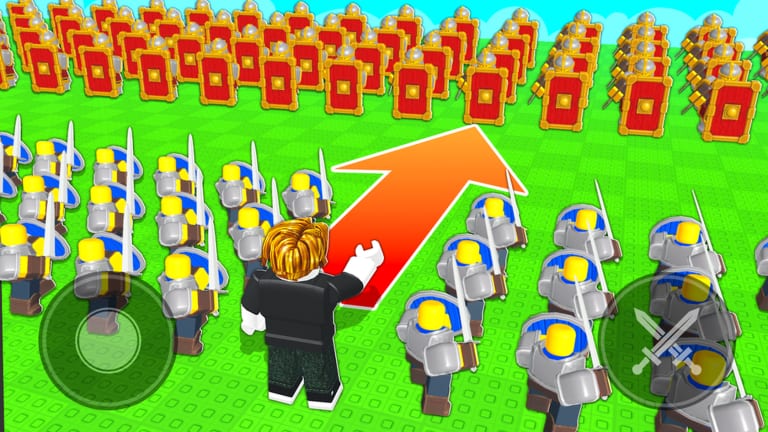
Command An Army is played from a commander view, not a locked first-person shooter. Official thumbnails show a left virtual joystick, a right crossed-swords control, and big E Attack / E Defend prompts. That art is the HUD philosophy: move on the left, orders on the right, match stance in the middle of your brain.
This page is the control map. If you want the loop, go to how to play. If you want to win with those buttons, go to how to win.
HUD geography
Left: movement. On mobile that is the floating stick. On PC that is WASD (standard Roblox) plus camera drag.
Right: orders and utilities. Codes live here. The crossed-swords icon in promotional shots is the combat/order cluster, not a separate minigame.
Center / world: your army. You are looking at troops, not only your avatar. If the camera is up the commander’s nose, pull it out until you can see the shield row.
Stance prompts: Attack and Defend with an E key cue. That is a round choice, not an emote.
PC baseline
Roblox PC defaults still apply unless you rebound them:
| Action | Typical control |
|---|---|
| Move commander | WASD |
| Camera | Right mouse drag / mouse lock |
| Jump | Space (rarely the point of this game) |
| Attack / Defend stance | E when the prompt is shown |
| Select / issue world orders | Left click on the battlefield and troop UI |
| Open codes | Right-side codes button (on-screen control, not a keyboard default) |
If E does something else on your account, check Roblox keyboard binds. Do not fight the prompt; the game is telling you the round is waiting on a stance.
Mobile baseline
Mobile is fully intended. The thumbnails are mobile HUD shots:
- Left stick moves you.
- Right cluster handles combat/orders.
- Attack and Defend are large buttons with an E label (the E is the PC hint; on touch you tap the button).
- Codes is still on the right. Landscape helps. Portrait covers the order cluster with your thumb — rotate.
Do not try to micro a Castle circle with one thumb over the stick and the other covering the order button. Brace the device, then form up before the round gets loud.
Camera is a weapon
If you cannot see the spear rank, you cannot stop Cavalry. Pull the camera up. Orbit until the point, your wall, and the enemy horse lane are in one frame. Commanders who play at skin-cam lose flanks. This is closer to a small-scale RTS than to a parkour game.
Orders versus walking
Walking your avatar into the enemy is not an order. Formations are. The official feature list calls out order formations as a pillar. Until you can:
- Place a wall.
- Face it at the charge lane.
- Send a closer around it.
…you are not commanding, you are participating. Practice in an empty-ish server. The formations page names the Castle circle; this page is only the hands.
Codes, shop, and inventory
Those windows are right-side or menu overlays. Opening them hides or blocks the same hand you use for orders. Redeem codes before the round. Sort inventory between matches. Skip Summon Spin is a pass, not a keybind.
Common control failures
I tap E and nothing happens. The stance prompt is not up. You are mid-round or still in tutorial.
My army does not move when I move. They are waiting on an order, or you never formed them. You are not a magnet unless a follow order is active.
I cannot find codes. Right side of the HUD. Tutorial may still be hiding utility buttons. See how to redeem.
Mobile orders never fire. Thumb overlap. Landscape, and lift the stick thumb before you tap the right cluster.
Camera inside the horse. Zoom out. You need the line, not the bridle.
Accessibility and lag
Launch lag was real. If clicks drop, reduce the on-screen army and issue fewer panic orders. A simple wall you can still rotate beats a 30-unit mess you cannot select. BUGFIX gems will not fix your bind; they only apologize in currency.
Once the hands are automatic, go back to getting started only if the economy is still confusing. Otherwise jump to how to win and stop thinking about the stick.
Frequently Asked Questions
Quick answers for codes, troops, and match setups.
What does E do in Command An Army?
When the prompt is shown, E chooses Attack or Defend. On mobile you tap the same labeled buttons.
Where is the codes button on each device?
Right side of the HUD on PC and mobile. Full redeem steps are on how to redeem codes.
Can I play Command An Army on mobile?
Yes. Official art is mobile HUD. Use landscape so the order cluster stays tappable.
Why won’t my troops follow me?
They follow orders and formations, not always your avatar. See how to play and formations.